


QuickBooks Payroll Error 30102 is a common issue that can happen when you try to send payroll information or create direct deposit paychecks. This error usually comes up because of internet connection problems, old browser settings, or temporary files which is stored on your computer. Sometimes, QuickBooks cannot connect to the payroll server because of the computer’s date and time are wrong or a firewall is blocking the connection. Before fixing this error, make sure you have a stable internet connection, an updated version of QuickBooks, and the correct computer settings. Some signs of this error include payroll not sending, error messages appearing on the screen, or the connection stopping suddenly.
Table of Contents
What is QuickBooks Payroll Error 30102?
QuickBooks Payroll Error 30102 is a payroll connection error that typically occurs when QuickBooks cannot communicate with payroll servers while sending payroll data or processing direct deposits. The issue is often caused by internet connectivity problems, browser settings, firewall restrictions, or payroll subscription issues.
Signs of QuickBooks Payroll Error 30102
You may have QB payroll Error message 30102 if:
- You see messages like “Payroll server error” or “Payroll connection failed.” ● The error appears while sending payroll data or printing direct deposit slips.
- QuickBooks freezes or crashes.
- QuickBooks asks you to change internet settings or clear temporary files.
- Payroll information cannot be sent successfully.
Requirements Before Fixing QuickBooks Desktop Payroll Error 30102
Before starting the fixes, make sure:
- Your internet connection is stable.
- Your computer date and time are correct.
- Internet Explorer is your default browser.
- Firewall or antivirus programs are not blocking QuickBooks.
- You are using QuickBooks in Single-User Mode.
- QuickBooks and payroll tax tables are fully updated.
Solution 1: Clear Browser History and Refresh Internet Settings
Sometimes old internet files can stop QuickBooks from sending payroll data. Clearing them may fix the problem.
Step 1: Clear Internet History
- Open Internet Explorer.
- Click Tools and then Internet Options.
- Under the General tab, find Browsing History.
- Click Delete.
- Select the internet files and website data you want to remove.

6. Click Delete again.
Step 2: Refresh DNS
- Click the Start button.
- Go to All Programs > Accessories > Run.
- Type CMD and press Enter.
- In the black window, type ipconfig /flushdns and press Enter.

Solution 2: Restart Your Computer
If your internet connection is not working properly, restarting your computer may help.
- Restart your computer.
- Keep all current settings the same.
- Open QuickBooks and try sending payroll data again.
Solution 3: Check Internet Settings
Wrong internet settings can stop QuickBooks from connecting to payroll services.
- Open Internet Explorer.

- Click Tools > Internet Options.
- Open the Security tab.
- Make sure no settings are blocking internet access.
- Check your payroll information carefully.
- Click OK and restart your computer.
- Try sending payroll again.
Solution 4: Update Computer and QuickBooks Settings
Incorrect computer or QuickBooks settings can also cause QB Error 30102.
- Restart your computer.
- Open Internet Explorer and restore the default Advanced Settings.
- Make sure your internet connection is working.
- Switch QuickBooks to Single-User Mode.
- Update QuickBooks to the latest version.
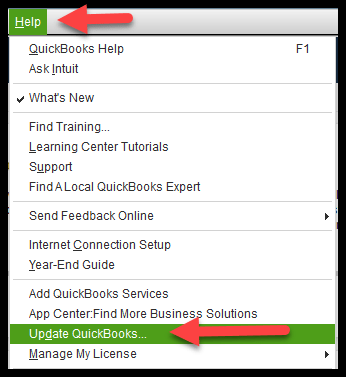
- Download the latest payroll tax table updates.
- Check that your computer’s date and time are correct.

- Set Internet Explorer as your default browser.
- In Internet Options, turn off “Check for publisher’s certificate revocation.”
- Use a stable wired internet connection if possible.
- Check your Payroll Subscription settings.
- Try sending payroll data again.
Solution 5: Run QuickBooks as Administrator
Sometimes QuickBooks does not have enough permissions to send payroll data.
- Close QuickBooks.
- Right-click the QuickBooks icon.
- Select Run as Administrator.
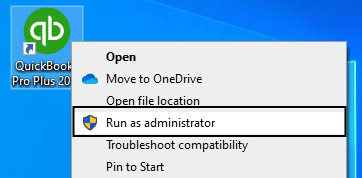
- Open your company file.
- Try sending payroll data again.
Solution 6: Verify Your Payroll Subscription
An inactive or expired payroll subscription can trigger QuickBooks payroll error code 30102.
- Open QuickBooks.
- Go to Employees > My Payroll Service > Account/Billing Information.
- Sign in to your Intuit account.
- Make sure your payroll subscription is active.
- If needed, update your subscription and try again.
Solution 7: Configure Firewall Settings
Your firewall may block QuickBooks from connecting to payroll servers.
- Open Windows Firewall settings.

- Allow QuickBooks through the firewall.
- Save the changes.
- Restart your computer.
- Try sending payroll data again.
How to Prevent QuickBooks Payroll Error Code 30102
Follow these tips to avoid this QuickBooks payroll internal error 30102 in the future:
- Clear browser cache and DNS regularly.
- Keep QuickBooks updated.
- Use the default Internet Explorer settings.
- Keep your computer’s date and time correct.
- Use a reliable internet connection.
- Turn off the Publisher’s Certificate Revocation setting if needed.
When Should You Get Professional Help?
You should contact a QuickBooks expert if the error keeps coming back after trying all the fixes. Payroll problems can delay employee payments and create tax issues. A professional can find the real cause of the problem and fix it quickly.
Frequently Asked Questions (FAQs)
How do I fix QuickBooks Payroll Error 30102?
You can fix QuickBooks Payroll Error 30102 by clearing browser cache, flushing DNS, checking your internet connection, updating QuickBooks Desktop, verifying your payroll subscription, and making sure your computer’s date and time settings are correct. If the issue continues, use QuickBooks Tool Hub or contact QuickBooks support.
Does updating QuickBooks help resolve Error 30102?
Yes. Installing the latest QuickBooks updates and payroll tax table updates can fix compatibility and communication issues that may trigger the error.
Why is QuickBooks unable to send payroll data?
QuickBooks can fail to send payroll data because of network issues, incorrect internet settings, an inactive payroll subscription, or software configuration problems.
Conclusion
QuickBooks Payroll Error 30102 is commonly caused by internet connectivity problems, incorrect browser settings, outdated QuickBooks components, payroll subscription issues, or firewall restrictions. When this error occurs, users may be unable to send payroll data, process direct deposits, or download payroll updates successfully.
By following the troubleshooting methods outlined above, including clearing browser cache, refreshing DNS settings, verifying your payroll subscription, updating QuickBooks Desktop, and reviewing firewall configurations, you can usually resolve the issue and restore normal payroll functionality.
To prevent QuickBooks Payroll Error 30102 in the future, keep QuickBooks updated, maintain a stable internet connection, verify payroll subscription status regularly, and ensure your system settings are configured correctly.